
Let's get this out of the way right at the start. This is a nerdy, technical, and very boring article. If you're not interested in home networking and troubleshooting, then I highly suggest you click away from this article. Otherwise, prepare yourselves for what is the most headache inducing journey to get Unifi equipment properly connected in uplink mode. Let's begin.
Some background
We're going to rewind time for a brief moment, to 2023. We had just moved into our current home, and with it came our "trusted" Linksys Velop system. At this point, the system was five years old and ready for an upgrade. I didn't upgrade, however, until 2025. I was waiting for the right moment, and money, to splurge on an entirely new setup: Ubiquiti/Unifi/UI.
The gold standard of tech YouTube and social media, I had been dreaming of getting into the UI system for a while. I might as well of been a kid in a candy store, picking up the Dream Router 7 and two U6+ Access Points. Later on, I picked up the Switch 8 Lite, and we were off and running. When the goodies were finally delivered, I quickly set them up and got everything working. Or so I thought.
Getting things "working"
The goal was to achieve an entirely wired setup, and that failed from the very start. The way our house was wired is very confusing, and none of the terminated ethernet runs in our basement were labeled. None of wires I tried worked at getting a connection, and no matter what I tried, everything showed as meshed within the Unifi Console. After countless hours of tinkering and breaking the network, I decided that Mesh Connect was fine for now™.
And honestly? It was. Our network was miles better than before and it was reliable, which was the most frustrating part of the Velop system. We ran the system in this configuration for a while without any issues, but when they started, they started in bunches. The internet would cut out throughout the day for a few seconds before quickly coming back online and speeds would plummet consistently, just as before.
Why Uplink over Mesh, you ask? Simple, Uplink is better! With an Uplink connection, performance is the highest it can be, provided the rest of the network is configured properly. That means speeds and reliability are consistently higher than Mesh.
The meltdown of 2026
Early in the morning of May 3, 2026, the internet went out again. This time, however, the router showed that there wasn't a steady connection coming in. The UDR reported 0.1mbps down/up, and no matter what I tried, nothing would get a connection. I tried connecting my laptop to a known port: connected. Connect the UDR to the same port? Nothing. The worst case in any scenario, I was unable to find the cause of the problem, and had to contact our local ISP.
Two days later the ISP arrived and told me what the phone rep. said, "it's the router." The technician said that the ethernet port was broken. The port he tried? The SFP+ port.
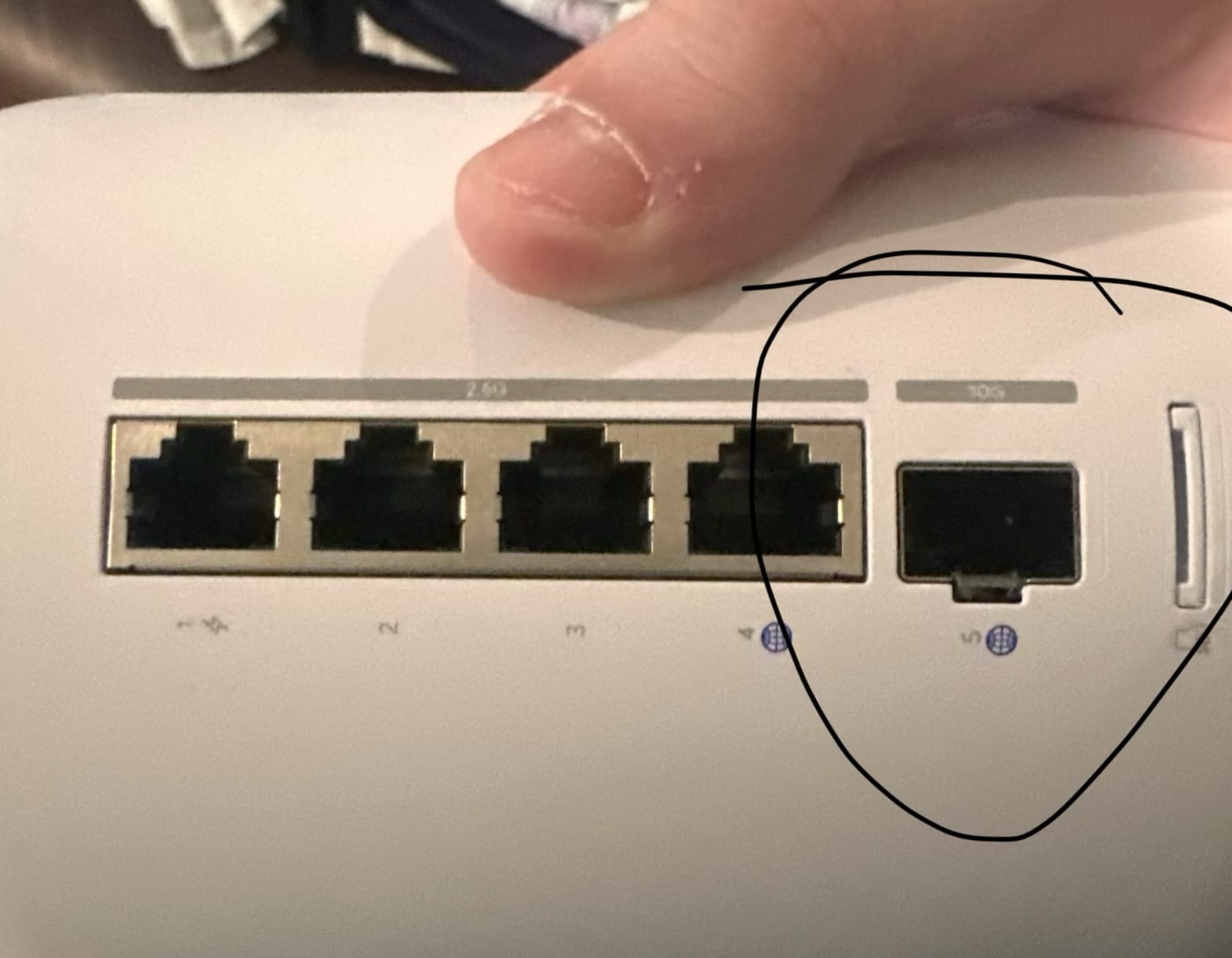 Not only that, the technician had never heard of Ubiquiti. Look, I understand that we're a bit insane when it comes to this stuff, but how are you in the profession and not know about a brand? A brand that I know has been installed several times in my neighborhood? That honestly stunned me more than the outage itself.
Of the requests I had of the technician when he was at the house was labelling two additional ethernet lines, the living room and upstairs bedrooms. He straight up refused, claiming he can only work with his business' color wire. What?!?!?! He also claimed to "not be an electrician," and that he "only [knew] networking." 🤔
Despite him outright denying my request, he was kind enough to leave a spare router so we could stay connected while I troubleshooted our router...for $18 a month.
Side note: I hate dealing with ISPs. They think they're so smart and then send a technician who "only knows" their stuff. What a joke. Anyway...
The ACTUAL problem
I wasn't able to get home until several hours later, and by then, of course, everyone had connected to the temporary network. After discussing things with them, I went back into the cave to try and figure out what the ISP technician couldn't. It didn't take long before I found one of the culprits. A network loop.
A network loop is like a digital hall of mirrors where data packets get caught in an infinite reflection, bouncing between switches forever. Because these packets never expire, they multiply into a "broadcast storm" that quickly overwhelms and freezes the entire network.
The tricky part about these loops is finding them. In our case, the loop was downstream, meaning it was somewhere within our connected devices. The poor technican was clearly in over his head, because once I unplugged several wires I suspected to be bad actors, the UDR went from showing "No Internet," which had taken over in the days since the outage, back to the 0.1mbps from before. I'm pretty sure the loop existed in the basement, where the switches, upstairs, and basement access point connected. It's confusing, I know, but once I unplugged the connections in the basement the router shot back to life.
That was only half the battle, however, because the router still wasn't receiving internet from our ISP. In fact, when I logged into UI and checked the Topology Map, I saw that the UDR was actually acting as the provider. Strange, right? At this point, the solution was, unfortunately, pretty clear: factory reset. And, like an idiot, I did it without a backup.
After resetting the UDR and connecting the ISP line, the router reported a real connection with consistent upload and download speeds. Not only that, our ISP was reported in the console. I had to configure everything again, but once I did, there was live internet flowing into/from the router. And setting everything up with the same name saved me a lot of time with reconnecting devices.
The aftermath
Following the resurrection of the network, I spent time tidying up some of the cables, though it still isn't perfect. I also started a new 3D print for a UDR holder to go on my server rack, which I'm quite excited about. But that's all small stuff compared to what was left.
Thinking back, it was procrastination, but the remaining access points and switch needed to be linked back into the network. I took my time doing so, but once I did, everything kicked back on and, finally, reported as "GbE (Uplink)" instead of "Mesh." Finally!
The rest of the reconfiguration was spent on the more tedious aspects of home networking, like setting up our VLAN for our smart devices, assigning networks, and, most fearfully, monitoring for any outages or issues.
So, for those keeping score, we now have a proper internet network running throughout the house, going from our ISP to the UDR, to the switch, back up to the APs. And I have to admit, my brain can finally rest knowing that, even for a second, I achieved uplink.
Logging off
That's my journey through what I call "Wi-Finsanity," and after everything, I'm more convinced that ISPs are among the most frustrating business to interact with. They constantly treat you like you're dumb, and then send someone who doesn't have a clue to fix your complex problem. Depsite this and their constant demands for us to buy their router/something else, they did manage to do one thing, and for that, I'm grateful.
On the flip side, the side that fixed it, I'm kind of proud, honestly. Networking has always been one of those areas that stumped me, and to finally get this configured the way I want it to be is pretty damn cool.
Catch you on the internet.
Nick out.